One command gives every AI tool your architecture, rules, and style. 22 languages. Measurable improvement.
Every metric quantified. Before Sigil vs. after — across speed, coverage, context quality, and automation.
Benchmarked across 4 AI models with 15 coding tasks each. Architecture-dependent tasks improve 17–23 points — from 74–80 to 96–97. 100% directive compliance. File summaries, entity maps, and stack detection eliminate guessing. Directives enforce your rules. Behavioral profiles shape how AI communicates. Sigil makes AI smarter.
15 tasks per model · 4 models · 120 API calls · v1.1 optimized context
Run sigil benchmark on your own project to verify
What coding with AI looks like — without Sigil, and with it.
Sigil scans your project — any project, not just code — and builds a structured map of your files, directories, and content. Entities, components, routes, exports, patterns, and relations. AI stops guessing what you're working on and starts knowing.
BFS blast radius: "what breaks if I change this?" Shows affected files, entities, components, routes within N hops.
Finds unreachable functions, unused exports, and fully removable files. Smart heuristics minimize false positives.
Complexity × git churn = where bugs live. Ranks files by risk score. Data-backed refactoring priorities.
Zoom/pan, blast radius overlay, churn heatmap, animated particles, degree sizing, directory clustering, minimap.
10 architectural checks: circular deps, god components, auth gaps, dead functions, config drift. Score 0–100.
Define rules with priority markers. Hooks inject them every prompt and block violations in real-time. AI can't miss what's mandatory.
Define how AI communicates — concise or detailed, formal or casual, your workflow rules. AI adapts to YOU.
One command configures Claude Code, Cursor, Windsurf, Cline, Copilot, and Continue simultaneously.
v1.1 format: 53% smaller. Library noise filtered, exports grouped, analysis data stripped. More signal per token.
AI queries architecture, health, impact, dead code, hotspots in real-time. Always fresh, sub-100ms cached.
Switch between projects without restarting. Context, directives, and history follow you across repos.
AI remembers across sessions. Auto-journals commits, active focus detects from your branch.
One-line role per file. AI understands purpose before reading. +50pt accuracy boost on file purpose tasks.
Not a developer? Use the web app →
It scans your files and folders — code, documents, configs, anything — and builds a structured understanding of what you’re working on. Like giving AI a map instead of making it wander blind.
Tell AI how you want it to behave. “Be concise.” “Always cite sources.” “Never change my writing style.” These rules are enforced automatically on every interaction — AI can’t ignore them.
Sigil feeds your project context and rules into your AI tools automatically. No copy-pasting. No repeating yourself. AI understands your project structure, follows your rules, and gives you better answers — every time.
Claude, Cursor, Copilot, Windsurf, Cline, Continue — Sigil configures all of them from one source. Switch tools without losing your context or your rules. One setup, every AI tool.
Define directives, extract architecture, visualize it, query it, analyze impact, find dead code, rank hotspots, track drift, check health — all from the terminal.
Define AI rules with priority, category, and conditions. Global directives cascade into every project. Project directives override globals.
Extracts architecture, loads directives, detects installed AI tools, and configures all of them in one command.
Scan your project into a structured context.yaml. Works on any project — code, docs, research, design. Code projects get deep analysis across 22 languages.
Display a formatted architecture summary in the terminal. Entities, components, routes, patterns — at a glance.
Interactive architecture visualization. Zoom/pan, impact blast radius, git churn heatmap, edge particles, directory clustering, minimap.
Describe any entity, component, or export. Shows fields, relations, props, hooks, and source location.
Detect architectural drift. See what changed structurally — added entities, modified props, removed routes.
Ask questions about your architecture. Dependency trees, reverse deps, import chains, dead function detection.
10 architectural checks. Circular deps, god components, auth gaps, dead functions, config drift. Score 0–100.
Token-optimized output for AI prompts. Critical directives always included, architecture pruned to fit your budget.
Auto re-extract on file changes. Context stays fresh without manual re-runs. 1.5s debounce, sub-100ms when cached.
Blast radius analysis. See what breaks before you change it — files, entities, components, routes affected within N hops.
Find unreachable functions, unused exports, and fully removable files. Estimates lines saved.
Complexity × churn = where bugs live. Ranks files by risk with visual bars. Find refactoring priorities.
Scan all registered projects at once. Extract, health check, auto-fix — one command heals everything.
Auto-fix detectable issues. Missing error boundaries, env config drift, stale exports — fixed in place.
Generate a shareable HTML architecture report. Drop it in a PR, Slack, or wiki — zero dependencies.
Define how AI should work with you — communication style, workflow rules, standards. Injected into every project.
List and manage all Sigil-tracked projects. See health, staleness, and stack at a glance.
Legacy rules from sigil.config.yaml. Simpler than directives — plain text rules injected into AI configs.
Install directive enforcement hooks for all detected AI tools at once.
Install a hook for a single AI tool. Fine-grained control over which tools get enforcement.
Remove enforcement hooks from a specific AI tool.
Activate Sigil Pro with a license key. Unlocks health checks, doctor, watch, MCP, and unlimited directives.
Check your current license status, plan tier, and expiration date.
Generate SEO-optimized meta content from your architecture. Descriptions, keywords, structured data.
View AI performance metrics. Directive compliance rate, violations blocked, per-project breakdown. Collected passively by hooks.
A/B test AI performance with vs without Sigil context. 10 tasks, graded on hallucination, correctness, and directive compliance.
Run sigil context --tokens 4000 — your AI receives a unified, token-optimized context with architecture and your directives baked in.
Add one line to your AI tool config. Sigil provides architecture + directives for all 22 languages on every session — no manual steps, always fresh, sub-100ms cached.
AI reads architecture + directives on session start in <100ms. Entities, routes, patterns, and your rules — everything, instantly.
File watcher auto-updates context when you save. Your AI never works with stale architecture.
AI can query dependency trees, import chains, dead functions, reverse deps — "what depends on User", "show import graph", "find dead code."
10 architectural checks: circular deps, god components, auth gaps, dead functions, config drift. Score 0–100 with actionable suggestions.
AI asks "what breaks if I change this?" before refactoring. BFS traversal across import, call, and component graphs. Shows affected files, entities, routes by depth.
AI finds unreachable functions and unused exports across the codebase. Groups by file, estimates lines removable, identifies fully dead files.
AI identifies the highest-risk files by churn × complexity. Prioritizes refactoring targets where bugs are most likely to occur.
Talk to AI that already knows your project. No API keys. No setup. Context-aware from the first message.
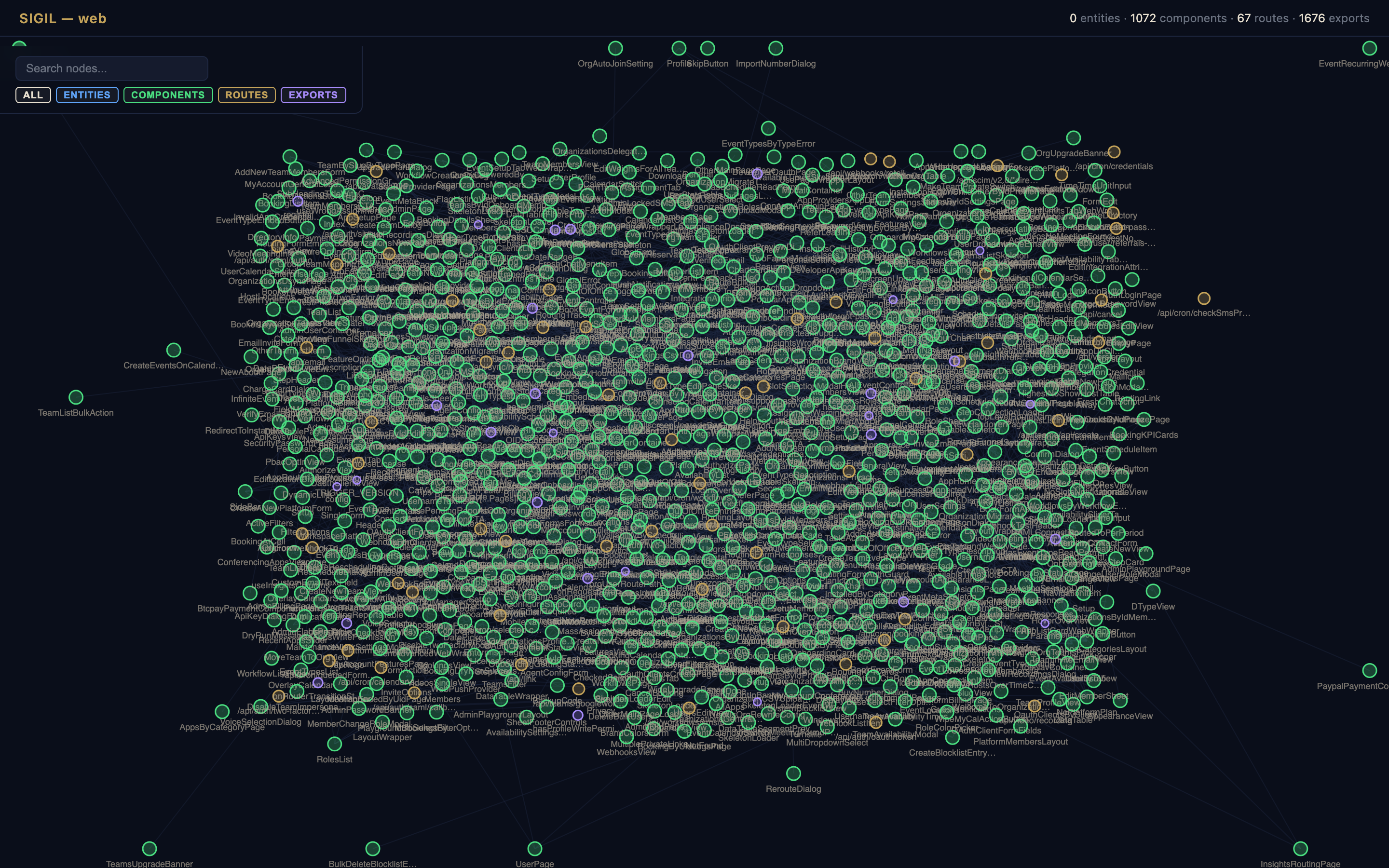
Zoom, pan, click for impact blast radius, toggle git churn heatmap, filter by type. Animated edge particles, degree-based sizing, directory clustering, minimap. Auto-shuts down when you close the tab.
Open live demo → · Cal.com: 1,072 components · 67 routes · 1,676 exports · parsed in 5.8s
Real scenarios where structured context changes everything.
Define "never hardcode secrets" once. It applies everywhere — Claude Code, Cursor, Windsurf, Cline, Copilot, Continue. Global directives cascade into every project. Project directives override when needed.
Large codebase? Sigil prunes intelligently. Critical directives always included. Architecture fills the remaining budget. Your AI gets the maximum context that fits — not a raw dump that overflows.
Sigil detects unreferenced functions, imported-but-never-called symbols, and env vars that are defined but unused (or used but undefined). Deep static analysis, no runtime needed.
New to a project with hundreds of files? Launch the interactive graph. Click through components, trace dependencies, understand the architecture visually — without reading a single line of code.
Existing tools solve pieces of the puzzle. Sigil is the complete picture.
| Feature | Sigil | repomix | aider repo-map | Cursor Indexing |
|---|---|---|---|---|
| Structured output | ✓ YAML/JSON | ✗ flat text | ~ tree-sitter map | ✗ proprietary |
| Architecture-aware | ✓ entities, routes, patterns, call graphs | ✗ file dump | ~ symbols only | ~ basic |
| AI Directives | ✓ priority, conditional, inherited | ✗ | ✗ | ~ .cursorrules only |
| Token-optimized | ✓ budget-aware pruning | ✗ | ✗ | ✗ |
| Interactive graph | ✓ force-directed | ✗ | ✗ | ✗ |
| Drift detection | ✓ structural diff | ✗ | ✗ | ✗ |
| Auto-configures AI tools | ✓ 10 tools | ✗ | ✗ | ✓ self only |
| Behavioral profiles | ✓ global + local | ✗ | ✗ | ✗ |
| MCP server (auto-context) | ✓ resource + tools | ✗ | ✗ | ✗ |
| Global + project rules | ✓ directives with inheritance | ✗ | ✗ | ✗ |
| Plugin system | ✓ any language | ✗ | ✗ | ✗ |
| Free tier available | ✓ Free + Pro | ✓ | ✓ | ✗ |
Define rules globally, override per-project. Priority-based pruning under token pressure. Conditional by language/framework.
Architecture + directives in one budget-aware payload. Critical rules never pruned.
Not a flat text dump — structured architecture with entities, components, routes, and relationships.
Force-directed visualization of your entire codebase. Click, search, filter by type.
Compare snapshots to see what changed structurally — added entities, modified props, removed routes.
Claude Code, Cursor, Windsurf, Cline, Copilot, Continue — one command configures all.
One config line. AI gets full architecture on every session. Auto-updates on file changes.
Define your identity, style, and workflow rules globally. Every project, every AI tool.
TypeScript, JavaScript, Python, Go, Rust, Java, Kotlin, PHP, C#, Ruby, Swift, Elixir, Dart, C/C++, Scala, Lua, Zig, Haskell, OCaml, Perl, R, Shell — all with lazy loading. Extend via plugins.
Get started free. Upgrade for health checks, auto-fix, watch mode, and unlimited directives.
Start free. Scale as you grow. Every plan makes your AI dramatically better.
You'll receive a license key by email. Activate it once — works on all your machines:
Key stored at ~/.sigil/license.key. Or set SIGIL_LICENSE_KEY env var for CI/CD.
Not a developer? Try the web app →
Latest improvements to Sigil.
Sigil gives AI real context about your projects — files, structure, rules, and how you work. It works for any project: code, documentation, research, design, business operations. For code projects, it adds deep architecture intelligence: entities, components, routes, call graphs, impact analysis, dead code detection, and more. It auto-configures Claude, Cursor, Windsurf, Cline, Copilot, and Continue with your context. Your AI tools go from guessing to knowing.
22 languages: TypeScript, JavaScript, Python, Go, Rust, Java, Kotlin, PHP, C#, Ruby, Swift, Elixir, Dart, C/C++, Scala, Lua, Zig, Haskell, OCaml, Perl, R, and Shell/Bash. Each has a dedicated parser that extracts language-specific constructs (React components, Drizzle entities, FastAPI routes, etc.).
Cursor rules are static text you write manually. Sigil automatically extracts your architecture, detects your stack, and generates optimized context for every AI tool — not just Cursor. One sigil init configures Claude Code, Cursor, Windsurf, Cline, Copilot, and Continue simultaneously.
sigil doctor scans all your registered projects in one sweep: extracts fresh context, runs health analysis (circular deps, god components, auth gaps, dead code), auto-fixes what it can (error boundaries, env config), and shows you what needs manual attention. One command, all projects healed.
Yes. The free tier includes architecture extraction, context output, show, diff, and up to 5 directives. Pro ($8/mo) adds health checks, sigil doctor, auto-fix, watch mode, MCP server, unlimited directives, and the project audit dashboard.
After purchasing, you'll receive a license key by email. Run sigil activate your_key in your terminal. The key is stored at ~/.sigil/license.key and works across all your machines. You can also set the SIGIL_LICENSE_KEY environment variable for CI/CD.
No. Sigil runs 100% locally. Your code never leaves your machine. The extracted context stays in your project directory as context.yaml. There is no cloud dependency, no telemetry, no data collection.